

One online store in my sample loads code from thirteen outside companies before a shopper sees a single product.
A review widget. An email sign up. A buy now, pay later badge. An Instagram feed. An advertising tracker. A wholesale pricing tool. A tag manager that loads more of its own.
Its server is fast. It answers in 0.7 seconds, which is better than most stores I measured. And the store still fails Google’s speed check on phones.
Nothing on that list is a bad idea. Every one of them was added on a normal day, for a good reason, by someone trying to sell more. That is exactly how it happens. And in November, most stores add one more. A countdown timer. A spin the wheel pop up. A gift with purchase app. A second promotion bar.
Here is the uncomfortable part. You will not find out what that last addition cost you until December. Google’s real visitor data covers the previous 28 days. A problem you add on 20 November shows up in the numbers after the sale is over.
What I checked this week
Last week I went back to 50 online stores to see what happened to their Black Friday pages. This week I opened the same 50 homepages and counted something simpler. How many outside companies load code on the page?
I read the page each store sends to a browser and listed every outside company whose code it names. Your own domain and your platform (Shopify, BigCommerce and the like) did not count. Apps, tracking, chat, reviews, payment badges and pop ups did.
Six stores refused my request or would not connect, so I have 44.
The typical store loads code from 4 outside companies
The highest count is 14
12 of 44 load code from 8 or more
Then I put those counts next to the real visitor data I measured on 16 October. For 32 stores I have both numbers.
Stores that failed Google’s speed check load code from a median of 6 outside companies
Stores that passed load code from a median of 3
Of the 10 stores with 8 or more, 7 failed
Of the 22 stores with fewer than 8, 8 failed
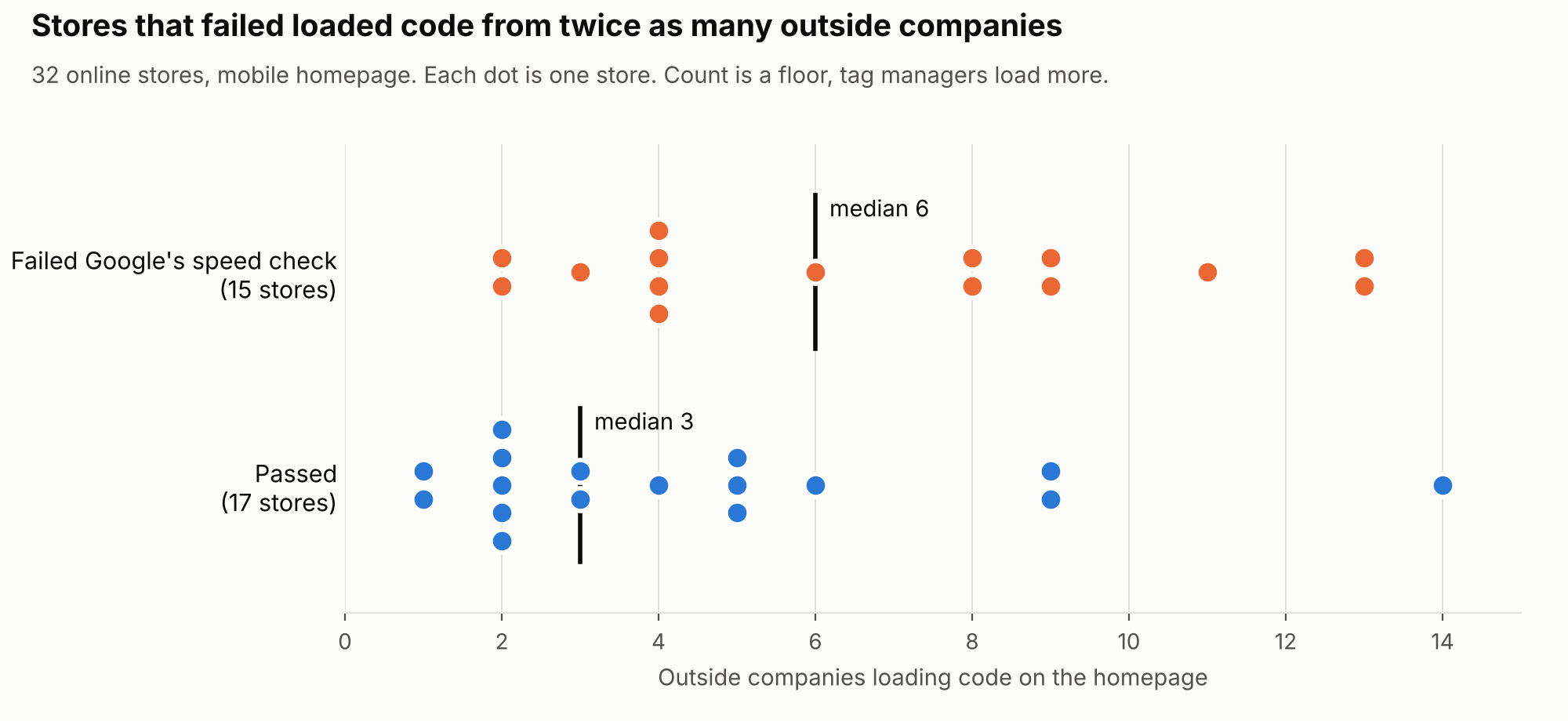
And one detail that matters more than the averages. The three failing stores with a slow server, the kind I wrote about two weeks ago, load code from only 2 to 4 outside companies. Apps were not their problem. But six of the seven failing stores with 8 or more had a server that answered in under 1.8 seconds. The seventh had no server figure at all. For those stores, the trouble starts after the server has done its job.
Most stores think November is for adding
Here is what most store owners believe. November is when you improve the store. You add the timer, the bundle app, the new banner, because this is the month with the most visitors to convert.
That is half right. It is the month with the most visitors. It is also the month in which every change runs, for the first time, under the most traffic you will see all year, and the month in which you are least able to measure what it did.
The cost is not theoretical. Every outside script is another company’s server your page waits for, another piece of code fighting for the same phone. In my sample, the stores that kept adding are the stores that fail.
To be fair to the other side, the store with the most outside code in my sample, 14 companies, passes comfortably. Someone there is keeping it tidy. So the number on its own does not sink you. Untested additions in your busiest month are what sink you.
So a code freeze does not mean touching nothing. It means fixing what is broken and adding nothing new.
Why I am telling you all of this
Deciding what to touch in a store, and what to leave alone, is most of what I do for clients. So yes, the list below is part of my work, and there is an offer at the end.
I am giving you the whole list anyway, because none of it needs me. It needs one decision, a date, and one message to everyone who can change your store.
The code freeze list
Pick a date for your code freeze. I would use Friday 13 November. From that day until your last delivery date before Christmas, these stay as they are.
1. Your theme, your design and your platform. No new theme, no redesign, no move to another platform. A theme change rewrites every template at once, and you will be testing it with your best customers.
2. Your addresses. No new product, category or collection addresses, and no reshuffling of collections. Every changed address needs a redirect, and every redirect is a chance to send a shopper to an error page. Last week I found four stores that had deleted a Black Friday page. Do not add to that.
3. New apps and new scripts. This is the one my data speaks to. If marketing insists on a countdown timer, the rule is one in, one out. Remove an app nobody uses before you add the timer. Then open the store on your own phone, on mobile data, and watch whether anything jumps.
4. Bulk changes to titles and descriptions. Rewriting hundreds of titles at once asks Google to look again at hundreds of pages at once. Rankings can wobble while it does. Do it in January, when a wobble costs less.
5. Redirect rules and your robots.txt file. One wrong line in either can hide a whole section of your store. If nobody has a reason to edit them this month, nobody edits them.
6. Your bot and firewall settings. This is the one almost nobody thinks about, so I checked it.
I read the robots.txt file of the same 44 stores. That is the small file that tells automated visitors what they may read. Two of them block GPTBot, the crawler OpenAI uses to train its models. None of the 44 block OAI-SearchBot, the one OpenAI uses for search answers in ChatGPT. None block PerplexityBot, Googlebot or Bingbot. In robots.txt, these stores are fine.
But one of those files was not written by the store. It was written by a setting in its security provider’s dashboard, the kind of setting you switch on with one click. And four other stores answered my plain request with “forbidden” both times I asked, which means a firewall decides who gets in, before robots.txt is ever read. From outside I cannot tell what those firewalls do to Google or to AI crawlers. Neither can the store owner, unless someone writes it down.
On a big sale day, traffic spikes and somebody switches on the strictest bot protection to be safe. That switch is not in robots.txt, and nobody remembers it in January. If you use Cloudflare or a similar service, open the bot settings once this week, write down what is on, and leave it alone until the sale is over.
The two things still worth fixing in November
These two pass the test. They fix something that is broken, they are small, and they can be undone in minutes.
1. Sold out products stay live. When a product sells out in the sale, do not delete the page and do not redirect it to your homepage. Google treats a redirect to an unrelated page much like a missing page, and the product loses what it had earned. Keep the page, say it is sold out and when it is back, and link to the closest alternatives. It is the same logic as never deleting your Black Friday page in December.
2. The price is the same everywhere. During a sale, the price on the product page, the price in your structured data (the code that describes the page to search engines) and the price in your Google Merchant Center feed must match. When they do not, Google can stop showing the product in Shopping, often in the very week prices change most. Use the sale price fields with start and end dates instead of overwriting the normal price by hand. In two weeks I will show you how often these three disagree in my sample, and why Google’s new shopping cart makes it matter more.
The ten minute check
Step 1. Open your homepage on your own phone, on mobile data, with wifi off. Does anything jump while it loads?
Step 2. Count your outside companies. On Shopify, open Apps in your admin. If you use Google Tag Manager, count the tags too. Write the number down.
Step 3. Next to each one, write what it earned you last month. Anything with no answer is your first candidate to remove, before 13 November.
Step 4. Open yourstore.com/robots.txt. Search the page for “Disallow: /” and read which visitors sit above it.
Step 5. Open your security or CDN dashboard and screenshot the bot settings. That screenshot is your January reference.
Step 6. Send one message to everyone who can change your store, including your agency, your developer and whoever runs marketing. The freeze starts on 13 November and ends on your last delivery date before Christmas.
Questions store owners ask me about this
My developer has a fix ready. Should I wait?
If it fixes something broken and can be undone in five minutes, ship it before 13 November. If it adds something new, it is a January job.
Is a code freeze only for big retailers?
No. Big retailers freeze because they have teams who would otherwise keep shipping. Small stores need it more, because one person usually makes the change, tests it and fixes it, and in November that person is packing orders.
Should I remove apps now?
Remove the ones nobody uses, before the freeze date, and then stop. Removing is also a change. On some platforms an uninstalled app leaves code behind in the theme, so open the store on your phone afterwards.
What if my count is high but I pass?
Then you are like the store with 14 companies that passes. Do not touch anything. Your job this month is to keep it that way.
When does the freeze end?
When your last delivery date before Christmas has passed. Then it is January’s list.
What I would not conclude
This is 44 homepages, mostly in New Zealand, with some in Australia and the UK. Code counted on 29 October, real visitor data from 16 October. It is not a rate for your market
The count is a floor. I counted only code named in the page the store sends. Tag managers load more after that, and 27 of the 44 stores use Google Tag Manager
I have both numbers for 32 stores. That shows a pattern, not a cause, and the store with the most outside code passes
The line at 8 is mine. The difference in medians, 6 against 3, is the sturdier number
A store that refused my request told me it has a firewall, not what that firewall does to Google or AI crawlers
Everything on the freeze list is a January idea
So is the work most stores put off all year. The full review of what is actually costing you money, in Google and in AI answers.
In January I am taking five stores through the AI Search Readiness Audit. I check your store the way I checked these 50, the indexing, the pages Google picks, the speed numbers that matter, and how often ChatGPT and Perplexity name you, measured with the repeated test from the day I asked ChatGPT the same question 33 times. You get a written list of what to fix, ordered by money, the same way I choose what is worth fixing first.
I am now taking applications. There are five places, and applications close on 18 December, because after that I cannot finish them all in January.
And here is the deal. If I do not find at least three fixes that you agree are worth more than the fee, you do not pay.
To apply, email me at neven@lobit.agency with the subject line “January audit” and a few lines about your store. Please write it as a normal email from your own address rather than replying to this newsletter, so it lands in my inbox and not in a filter. Something like this is perfect.
Subject: January audit for [your store name]
Hi Neven,
I read your post about what to freeze before Black Friday, and I would like to apply for one of the five January places for the AI Search Readiness Audit.
My store is [yourstore.com]. We sell [what you sell], and most of our customers are in [your main countries]. The store runs on [Shopify, WooCommerce or another platform], and we have been selling online for about [number] years.
The thing I most want to understand is [for example, why our category pages do not rank, or whether ChatGPT ever recommends us]. I can give you access to Search Console and Google Analytics if you need it.
Thanks,
[Your name], [your role at the store]
I answer every application personally within two working days, with the next steps and a date.
Not ready for that? Send me your Black Friday page.
The offer from last week still stands until 13 November. Paste your Black Friday address and I will tell you, in writing, whether Google can find it, whether last year’s links still reach it, and the one thing I would fix first. Free, no call.
Or email the address to neven@lobit.agency with the subject line “Black Friday page”, and a line on what you sell and where. I read every email.
Next week, Google’s new shopping cart, and why 26 of the 50 stores I checked may already be wired for it.
Neven Lovreković
Ecommerce SEO strategist
neven-lovrekovic.com · LinkedIn
P.S. The store with thirteen outside companies did nothing strange. It added one good idea at a time, like most of us. This month, add nothing. Fix what is broken, freeze the rest on 13 November, and email me at neven@lobit.agency if you want the rest of the list done properly.