

One online store in my sample is ready for Google’s new shopping cart.
A small file on its server tells Google that it supports a cart, a checkout and discount codes. That file is what Google’s new cart looks for when it wants to hand a shopper’s basket over to a store.
Then I opened three of its product pages and read the code that describes each product to Google. Name: yes. Photo: yes. Brand: yes. Product code: yes.
Price: nothing. In stock or sold out: nothing.
The shopper sees the price. Google, reading the code, does not.
Nobody at that store chose this. Their platform switched the cart part on. Their product pages were built long before anyone thought about it. That gap, between being wired for Google’s cart and telling Google the basics, is what this week is about.
What Google launched
On 15 October, Google launched Universal Cart in the US. It works in Google Search, including AI Mode, and in the Gemini app.
A shopper saves products from different stores into one cart. Google then tells them when a price drops or a product is back in stock, shows them promo codes, and lets them pay with Google Pay or send the cart to the store’s own checkout. Google names Nike, Sephora, Target, Walmart and “many Shopify merchants” among the stores taking part.
In September I wrote that AI finds your products, but the sale can happen somewhere else. Universal Cart is Google’s version of that, built into the search box.
Two things matter if you sell outside the US:
It is US only for now. Google’s Merchant Center help says Australia and Canada follow next year. For the UK, Google said “later” in May and has not given a date since.
The alerts run on your data. A price drop alert can only be as right as the price Google holds for your product. That price comes from your feed and your product pages, and Google Shopping uses the same data in your market today.
What I checked this week
Last week I promised to show you how often the price on the page, the price in the code and the price in your Merchant Center feed disagree. So I went back to the same 50 stores I have followed since October, mostly in New Zealand, with some in Australia and the UK.
First, the file. It sits at an address ending in /.well-known/ucp. UCP stands for Universal Commerce Protocol, the standard Google and Shopify built for this kind of checkout.
26 of 50 stores publish it, the same 26 as on 19 October
All 26 announce cart, checkout and discount support
23 of the 24 Shopify stores in the sample have it, and so do all 3 BigCommerce stores
None of the WooCommerce, Squarespace or other stores have it
That pattern tells you who did the work. These stores did not wire themselves for Google’s cart. Their platform did.
Then the prices. I picked three product pages at random from each store, opened them in a real browser, and compared what a shopper sees with what the code tells Google. Twelve stores refused my requests or had no product list I could use, so I have 113 pages from 38 stores. I checked every disagreement by hand, on a screenshot.
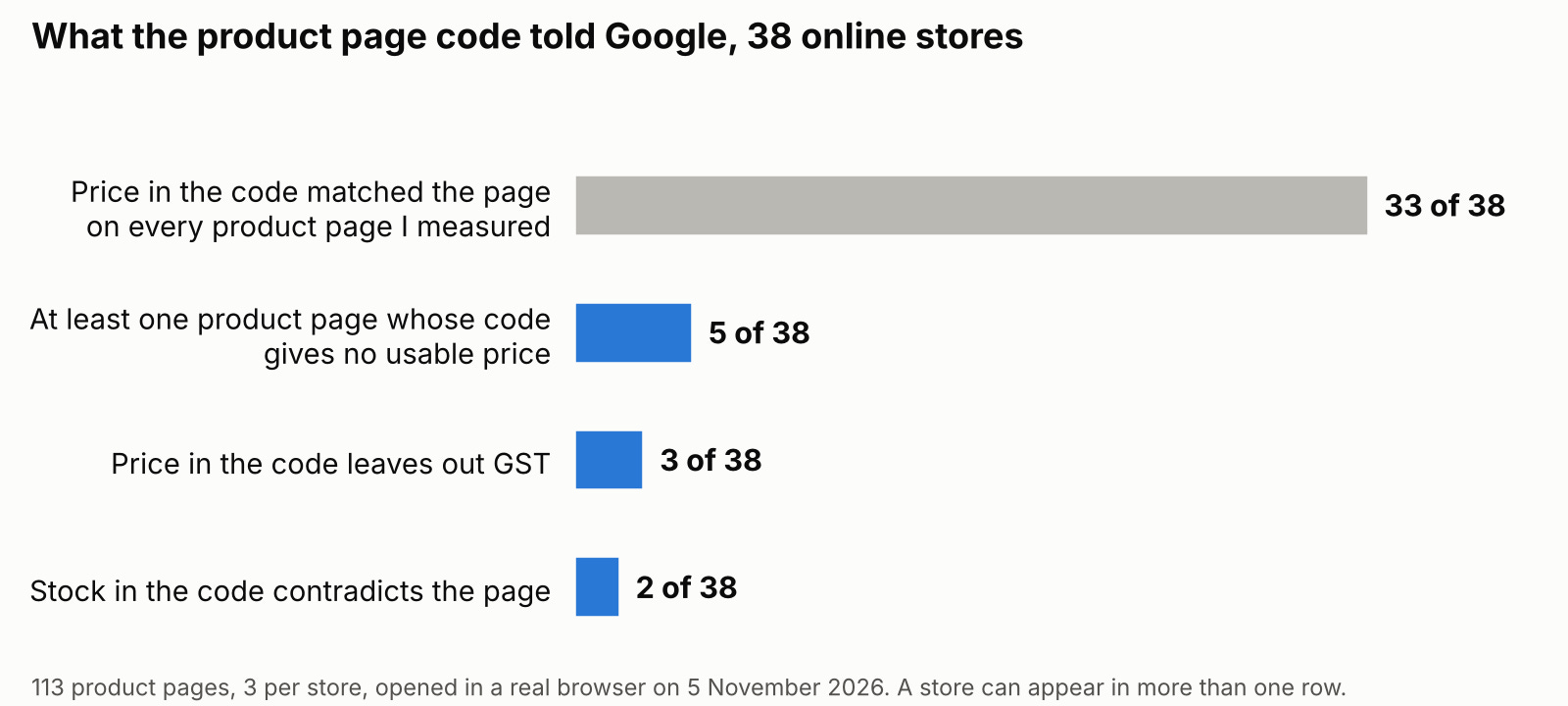
I expected wrong prices. I found missing ones.
Here is what most people believe about product data, and I believed it too. The danger is a price that does not match. You change prices for a sale, the code or the feed lags behind, Google notices and pulls the product.
That risk is real. But in my sample it barely happened.
On 101 pages the code carried a price. On 100 of them it matched what the shopper saw. My tool flagged 16 mismatches at first, and all 16 were my mistakes, not the stores’: a crossed out old price, the price of a related product, pence printed in small type. The stores were right every time.
What I did find is worse, because nothing warns you about it:
5 of 38 stores have at least one product page whose code gives Google no usable price. Three of them gave no price on any of the three pages I opened. One is the store from the top of this post.
In one store, the page shows the price, says 6 in stock and has an Add to Cart button. The code says out of stock, with the price left empty.
In another, it is the other way round. The page says out of stock and shows no price. The code says in stock, at 7.99.
3 stores put the price before GST in the code. They sell mostly to businesses, so showing prices before tax on the page is deliberate. But Google’s Merchant Center rules say that outside the US and Canada, the price should include tax. Two of those three are wired for the new cart.
A wrong price is loud. Google sends you a warning. A missing price is quiet. Nobody sends anything, and your product simply has less to stand on.
To be fair to the other side, your Merchant Center feed is Google’s main source for Shopping, and a store with a clean feed is in better shape than its page code suggests. But Google also reads your pages, and it can use the code on them to check your feed and update price and stock. When your page code and your feed say different things, you have left Google to decide which one to believe.
And here is my own gap. I could not see the third column. The feed is private, only the store can see it, so I measured two of the three prices I promised. You can check the third yourself in five minutes. I will show you how below.
So what is actually your job?
If your platform did the wiring, what is left for you? The data the wiring carries. Price, stock and tax, on every product page, in a form Google can read.
That is also the kind of work I do for clients: finding the problems nothing warns you about. So yes, there is an offer at the end of this post. Everything before it works without me.
Five checks before the cart reaches your market
1. Is your store wired? Open yourstore.com/.well-known/ucp in your browser. If you see a page of text with words like “checkout” and “cart”, your platform has done it. If you get an error page, you are not wired, and outside the US that costs you nothing today.
2. Does your code carry a price? Paste one product page into Google’s Rich Results Test. Open the product result and look for a price and an availability line. Do it for three products, not one. One page can be fine while another is empty.
3. Test a sold out product. Pick a product you know is sold out and run the same test. The code should say OutOfStock. Then test one you know is in stock. In my sample, the stock errors sat on exactly these pages.
4. Check the tax. If you sell outside the US and Canada and your pages show prices before tax on purpose, open Merchant Center and see whether it already flags your prices. If it does, you have your answer. If you are not sure what it is telling you, that is a question for your developer, not a guess.
5. Check the third column yourself. In Merchant Center, open your products, pick three, and compare the price Google holds with the price on your page. Then look at the products Merchant Center says need attention, and read any issue that mentions price or availability.
All five pass last week’s code freeze rule. They fix something broken, they are small and they can be undone. Run them before Friday 13 November, the freeze date I suggested.
Questions store owners ask me about this
Universal Cart only works in the US. Why should I care in the UK or New Zealand?
Two reasons. Google has said Canada and Australia come next year. And the price and stock data the cart runs on is the same data Google Shopping uses in your market now. Fixing it pays today, not only when the cart arrives.
I am on Shopify. Did Shopify switch this on for me?
The file, yes. 23 of the 24 Shopify stores in my sample publish it, whether the owner knows or not. Checkout inside Google is a separate step. In September, Google told eligible US Shopify merchants that their products could now be bought on Google, with “nothing for you to set up“. It is on by default and can be switched off in the Shopify admin under Sales channels, Agentic. Outside the US, there is no route for it yet.
I am on WooCommerce. Am I left behind?
Not this month. None of the WooCommerce stores in my sample publish the file, and outside the US it would not do anything yet. Your product page code is the part you control on every platform. Start there.
My feed is right. Does the code on my pages still matter?
Yes, because Google reads both. The feed is the main source, but the page code is how Google checks it and keeps price and stock up to date between feed updates. Two sources that agree are stronger than one.
Can I measure what the cart brings me?
Not fully, and nobody can yet. Google reports cart transfers and checkouts in Merchant Center, but there is no documented number for products saved to a cart. For US Shopify stores, Shopify’s help says Google Analytics will not record purchases that go through checkout on Google, as Search Engine Journal reported. Track what you can and be wary of any tool that promises more.
What I would not conclude
This is 113 product pages from 38 stores, three pages each. It is a sample, not a catalogue. For 5 pages with options, I did not compare stock option by option
I measured from Croatia, on one day. Three Shopify stores showed my browser prices in euros, on the page and in the code. Consistent, but a reminder that the same page can tell different visitors, Google included, different prices
I did not see a single Merchant Center feed
I say nothing about how Universal Cart uses this data in these markets, because it is not live there
The wiring was free. The data is not.
Your platform gave you the cart connection for nothing. What it cannot give you is a store whose every product page tells Google, and the AI assistants that read Google’s data, the right price, the right stock and the right tax.
In January I am taking five stores through the AI Search Readiness Audit. I check your store the way I checked these 50: product data in your pages and your feed, indexing, the pages Google picks, the speed numbers that matter, and how often ChatGPT and Perplexity name you, measured with the repeated test from the day I asked ChatGPT the same question 33 times. You get a written list of what to fix, ordered by money.
I am now taking applications. There are five places, and applications close on 18 December, because after that I cannot finish them all in January.
Here is the deal. If I do not find at least three fixes that you agree are worth more than the fee, you do not pay.
To apply, email me at neven@lobit.agency with the subject line “January audit” and a few lines about your store. Please write from your own address rather than replying to this newsletter, so it lands in my inbox and not in a filter. Something like this is perfect:
Subject: January audit for [your store name]
Hi Neven,
I read your post about Google’s new cart and I would like to apply for one of the five January places.
My store is [yourstore.com]. We sell [what you sell], mostly to customers in [your main countries], on [Shopify, WooCommerce or another platform].
The thing I most want to understand is [for example, whether Google reads our prices correctly, or whether ChatGPT ever recommends us].
Thanks,
[Your name], [your role at the store]
I answer every application personally within two working days.
Not ready for that? Send me one product page.
Until Friday 13 November, paste the address of one product page and I will tell you, in writing, whether its code gives Google the right price, stock and tax, and the one thing I would fix first. Free, no call. The free Black Friday page check runs until the same day, so put both addresses in one email if you like.
Or email the addresses to neven@lobit.agency with the subject line “Product page check”, plus a line on what you sell and where. I read every email.
Next week, the free authority sitting unused inside your store: internal links, and five changes you can make without a developer.
Neven Lovreković
Ecommerce SEO strategist
neven-lovrekovic.com · LinkedIn
P.S. The store at the top of this post did nothing wrong on purpose. Its platform wired it for Google’s cart, and its product pages never told Google the price. Run the Rich Results Test on three of your products before 13 November. If you would rather have the whole store checked properly, email me at neven@lobit.agency about January.
The silent missing price is what worries me most, because it never shows up as a disapproval in Merchant Center: the feed keeps serving while the page markup says nothing. Among the 5 stores with empty price in the code, did you see variant-level offers or prices injected only by JavaScript? On Shopify themes with custom variant pickers that's usually the culprit we find first, before anyone blames the feed.