

Here is the uncomfortable part.
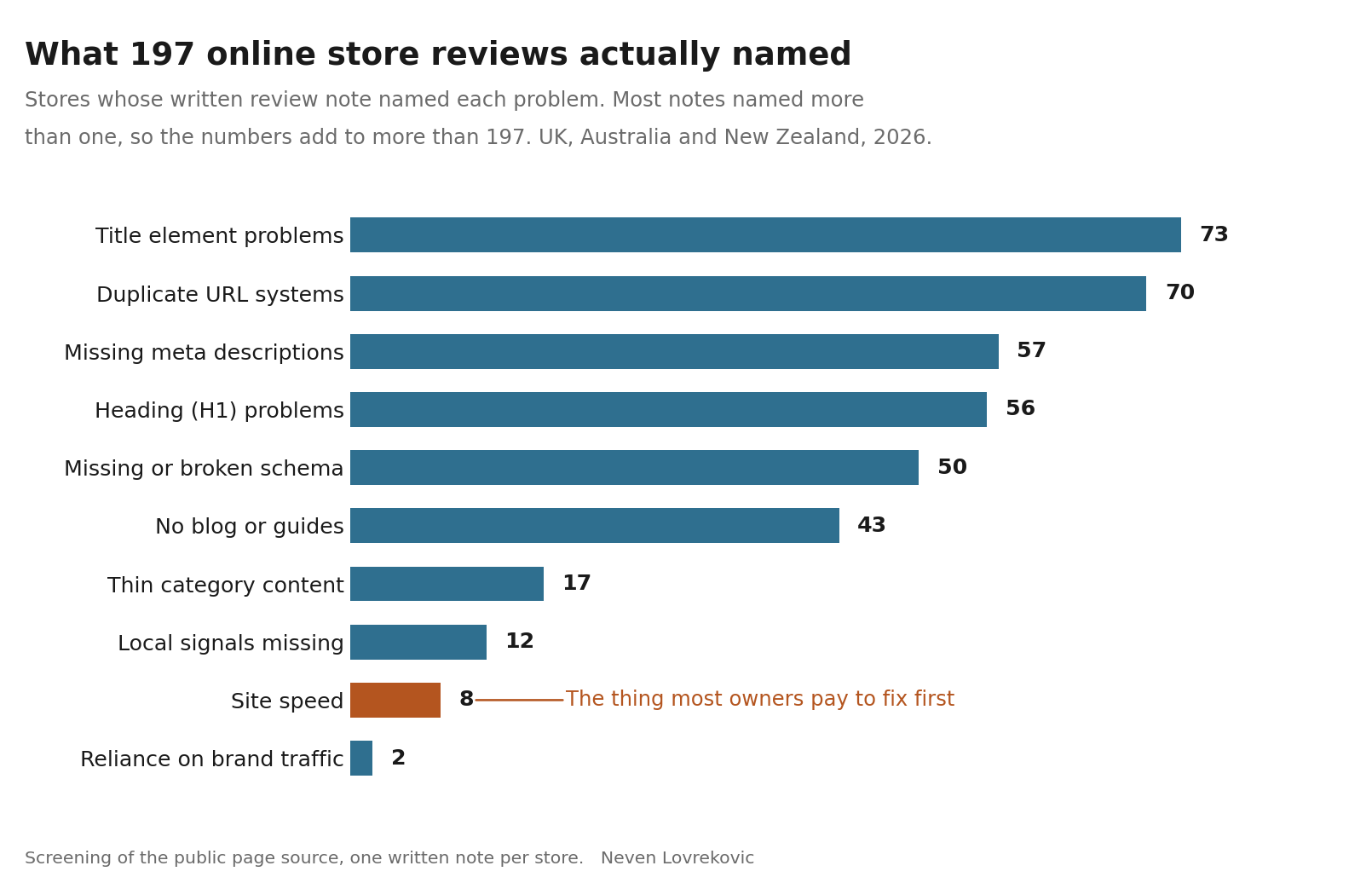
The problem I found most often in 197 online stores was not the one costing those stores the most. And the problem their owners spend money on first, before anything else, before anybody has asked what is actually wrong, showed up in eight stores out of 197.
Between May and July this year I reviewed 197 small and mid sized online stores by hand, across the UK, Australia and New Zealand. For each one I opened the public page source and wrote down what was wrong.
I want the limits of that on the table before you read a single number. This was a screening, not a full audit. No crawl data, no Search Console access, no rank tracking, nothing behind anybody’s login. A screening tells you what is broken on a page. It cannot tell you what that page was earning before it broke.
Two weeks ago I promised you this write up. Before publishing it I went back and recounted every note from scratch, and I am glad I did, because one number I had been repeating did not survive the recount. I will come to that, because it is the most useful thing in this post.
How to read the numbers
Each of the 197 stores has one written note. Most of those notes name more than one problem, because most stores have more than one. So when I say a problem showed up in 70 stores, I mean 70 of the 197 notes named it.
On average each note named two problems. Two thirds of the stores had at least two named. Twenty one notes named something that did not fit any of the ten groups below, mostly internal linking and domain cannibalisation.
The numbers add up to more than 197 for that reason, and not because I have counted anybody twice
.What most store owners believe
Most owners believe the expensive problem is the one they can feel.
The site feels slow on their phone, so slowness becomes the problem. It is the one thing in this entire field that a non technical person can experience directly, and there is an industry of tools ready to put a red number next to it.
Eight of the 197 notes named site speed. Four percent.
The other 189 stores had something wrong that nobody could feel by using the site, because you cannot feel a canonical tag pointing at the wrong page, and you cannot feel your homepage title beginning with your own domain name.
I want to be fair to the speed people. When a store genuinely does have a speed problem it is usually severe, it usually sits on mobile, and fixing it is worth every hour. I am not telling you speed does not matter. I am telling you that in 197 stores it was almost the rarest thing I wrote down, and it is reliably the first thing anybody pays for.
The thirty second version
Open your own store on your phone, on mobile data, with your office wifi turned off.
If it shows you something readable in a couple of seconds, congratulations, you are one of the 189. Now you have a harder question to answer, which is what your actual problem is.
How I ordered this list, and what the order is not
If I am going to tell you what each problem costs, I owe you the method.
Three questions decide where a problem sits.
First, does it stop a page that is already able to earn? A fault on a page nobody was ever going to reach is cheaper than the same fault on the page that takes the money.
Second, how many pages does it touch? One broken product page is a bad afternoon. A template fault on every product page is a quarter.
Third, what does the fix cost you? A problem you can fix by typing on a Tuesday is cheaper to carry than one that needs a developer or six months of writing.
Now the honest part. This order is a judgement built from the review work and from what I see when I do get access to a Search Console. It is not a measurement. I had no traffic data for these 197 stores, so nobody should read this list as a price list. Read it as the order I would work in if I woke up tomorrow owning your shop and knew nothing else about it.
The ten problems, most expensive first
1. Duplicate URL systems. Named in 70 of 197 notes, 35.5 percent.
First, because it is the only problem here where the damage happens before anybody sees anything. Filter combinations, sort orders, page two and three, tracking parameters, a second domain serving the same catalogue, all of them become their own addresses. Google spends its visits on those instead of on the pages you want it to visit, and your real category page ends up as one of forty near identical versions, none of which is obviously the one. I found stores serving the same brand catalogue at three different URL patterns at once, and stores whose every add to cart link spawned another crawlable address. It happens because faceted navigation generates a URL for every combination somebody can click, and on most platforms that is the default rather than a decision anybody made. I am taking this one on its own next week.
2. Title element problems. Named in 73 of 197 notes, 37.1 percent. The most common thing I wrote down.
Second by cost, and first by frequency, which is the closest thing to good news in this post. The loss is happening right now, on impressions you have already earned, and you do not need one extra visit from Google to benefit from fixing it. You need the people already seeing you to click. What I actually found was worse than vague. One homepage title opened with the bare domain. One rendered as nothing but a dash and the brand, because a template left the prefix empty. One began with the word Home. One was ninety characters of padding that Google simply rewrote. That is the single piece of copy you get to write in the search results, and it is being generated by a template nobody has read since launch.
3. Heading problems. Named in 56 of 197 notes, 28.4 percent.
Third because a page with no clear heading has not said what it is about, and every system reading it now has to guess. I found homepages whose only heading was the word Home, homepages whose heading was the shop name and nothing else, homepages with no main heading in the body at all, and category headings that rendered a template prefix followed by a double space. None of that is visible to a customer, who knows perfectly well what they are looking at. All of it is visible to the machine deciding what you are.
4. Missing or broken structured data. Named in 50 of 197 notes, 25.4 percent.
Fourth because it does not cost you rankings, it costs you the extra lines. Price, availability, review stars, the things that make a result look like a shop rather than a link. The broken half is the more annoying one, because a store with invalid markup believes this is handled. It happens because an app added markup two platform versions ago and nobody has validated it since.
5. Thin category pages. Named in 17 of 197 notes, 8.6 percent.
Fifth because category terms are the money terms, and this is the cheapest problem in the top half to fix. Nobody with a credit card in their hand searches for a product code. They search for the category, and a category page with a heading and a grid and no sentence anywhere is competing on very little. The fix is writing, and you already know more about your own category than anybody you would hire to write it.
6. No blog, or a blog that stopped in 2023. Named in 43 of 197 notes, 21.8 percent.
Sixth, and this is where the order gets uncomfortable for people who sell content. The cost is real, because you never appear in the part of the buying process that happens before somebody knows what to buy, and that is exactly the part assistants now answer. But the fix is the most expensive on this list in hours, the slowest to pay back, and doing it badly is worse than not doing it. If you have any of the five problems above this one, this is not where your next thousand goes.
7. Missing meta descriptions. Named in 57 of 197 notes, 28.9 percent. The third most common thing I wrote down.
Seventh, and I am putting it here knowing that half the checklists on the internet have it in their top three. Google rewrites most meta descriptions anyway, from the page, whether you wrote one or not. The cost of leaving it blank is that you hand over the one line of copy you could have controlled. That is a real cost and a small one. It is on this list because it is easy and worth doing, not because it is urgent.
8. Local signals missing. Named in 12 of 197 notes, 6.1 percent.
Eighth because for most of these stores it is not a fault at all. If you ship nationally and have no counter anybody can walk up to, this is a non issue. If you do have a physical location, it jumps into the top three and this whole ordering changes for you. I found shops with real premises and no page anywhere on their site that said where they were.
9. Everything riding on brand searches. Named in 2 of 197 notes, 1.0 percent.
Ninth, and it is here as a warning rather than a fault. A store whose traffic is almost all people typing its name feels wonderful right until the quarter it stops growing, because there is no mechanism in it for meeting anybody new.
10. Site speed. Named in 8 of 197 notes, 4.1 percent.
Last. Almost the rarest thing I wrote down, the most expensive per unit of gain, and the first thing most owners buy. When it is genuinely broken, fix it. The problem is that almost nobody checks whether it is genuinely broken before paying to have it fixed.
The two things I expected to find far more of
This is the part I would have skipped if I had not recounted.
Site speed. Eight of 197. I went in expecting a third of these shops to be slow, because that is the story the tooling tells. They were not. The stores were mostly fine on speed and mostly broken on things no tool puts a red number next to.
Copied manufacturer product descriptions. Two of 197 notes named it. Two.
I have to be straight with you about that second one, because the number is almost certainly wrong about the world. Reading a page’s source tells you what is on that page. It does not compare your sentences against every other shop selling the same item, and that comparison is the only way to catch a copied description. So the honest reading is not that copied descriptions are rare. It is that they are nearly invisible to this kind of review, and I had been treating a number as a finding when it was really a limitation of my own method.
If you want to know whether it applies to you, the check takes ninety seconds and it is in the section below. Do not take my two out of 197 as comfort.
The pattern under the list
Line up the two orders and the shape is obvious.
The three most expensive problems were named in 70, 73 and 56 of the notes. The thing that gets bought first was named in eight.
There is no conspiracy in that. The expensive faults are invisible to the person who owns the shop, and the cheap one is the only one they can feel. Every store owner I have spoken to is rational. They are acting on the only evidence anybody has handed them.
The questions I get asked
Why would I not just do all of this myself?
You should, and most of it is typing. The part that takes experience is not making any single change on this list. It is knowing which of the ten is actually yours, because the order above is the general case and your store is a specific one. Get that wrong and you can spend a full quarter on your fourth biggest problem and watch the graph do nothing.
How long before anything moves?
Weeks, and it depends which problem. Titles can move clicks inside a fortnight, because the impressions are already there. Duplicate URL work takes as long as it takes for everything wrong to be recrawled. Content work takes months, and you should plan in quarters rather than weeks.
What if I find five of these on my store?
Then you are normal, and you now have the only thing that actually matters, which is an order to work in. Five problems with an order beats one problem without one.
Is this not just a standard SEO checklist?
The ten items are not unusual. The ordering came out of the 197, and the ordering is what decides where your money goes. Anybody can hand you a list of things that can be wrong with a shop. What that list will not tell you is which one to do on Monday.
What to do with this
If you have read this far you already suspect which two or three of the ten are yours. Start with whichever sits highest on the list, not whichever is easiest.
There is no deadline on any of it, which is exactly why none of it gets done. The only real cost of waiting is that every problem here compounds quietly. A duplicate URL settles further in with every recrawl. A category page with nothing on it loses another month of a term you could have owned. None of this gets cheaper by being left.
Below this line is the working version of the review. The same ten checks, in the same order, written so you can run them on your own store today with no tools and no budget. It takes about twenty minutes. Subscribing is free and takes one click.
The 20 Minute Store Check
Ten checks, in cost order, the same order as the list above. Every one of them detects. None of them fixes, because the fix depends on your platform and I would rather you knew what you have before anybody sells you the cure.
Work down the list and count your failures. The count is the point.
Check 1. Are your own URLs competing with each other?
How. In Google, type site: followed immediately by your own domain, with no space, then a space and the name of one busy category. Read the blue lines on the first two pages of results.
If it fails. The same category appears several times with different tails on the address, filters, sort orders, page numbers. Every one of those is a version of a page that was supposed to be one page.
Check 2. What does your title actually say?
How. Search your own store name. Read the blue line of your homepage result, then do the same for one category.
If it fails. The line opens with your bare domain, or with a stray character, or with the word Home, or with words no customer would type. You get roughly sixty characters and you are spending the first thirty on nothing.
Check 3. Does your homepage say what it sells?
How. On your homepage, right click and choose view page source, then use Ctrl and F for <h1.
If it fails. Nothing comes back, or what comes back is your shop name, or the word Home. A customer knows what they are looking at. The machine reading the page does not.
Check 4. Does your structured data exist and does it work?
How. Open a product page, view page source, and use Ctrl and F for the word Product. Then do the same for AggregateRating and Offer.
If it fails. Nothing comes back, or something comes back that your platform added years ago and nobody has validated. Both count as a failure here.
Check 5. Do your category pages say anything at all?
How. Open your three most important category pages and scroll. Ignore the product grid.
If it fails. There is a heading, then products, and no sentence anywhere explaining what this category is, who it is for, or how to choose. That page is trying to rank on a heading.
Check 6. Has anything been published in the last year?
How. Look at the date on your most recent article, guide or buying guide.
If it fails. There is nothing there, or the date starts with 2023. Score it as a failure, then look at where it sits in the order above before you do anything about it.
Check 7. Did you write the description under your own blue line?
How. Search your store name again and read the two lines of grey text under your homepage result.
If it fails. The text is a fragment of the page, cut off mid sentence, because you left the field empty and something had to go there.
Check 8. If you have a physical location, does anything say so?
How. Search your store name and your town together.
If it fails. Nothing comes back that ties the two together. Skip this check entirely if you have no counter anybody can walk up to.
Check 9. How much of your traffic is people already looking for you?
How. If you have Search Console, open Performance and sort by query. If you do not, search three things you sell, in the words a customer would use, with no brand name anywhere.
If it fails. Your own name sits at the top of the query list by a distance, or you cannot find your own shop for a single one of the three product searches.
Check 10. Is your store actually slow?
How. Open your store on your phone, on mobile data, with your office wifi turned off. Count.
If it fails. It takes more than about four seconds to show you something readable. If it does not fail, and for most stores it will not, stop paying for this one.
The ninety second bonus check
This is the one my review method could not do for you, so do it yourself.
Open your three best selling products. Copy one full sentence from the middle of each description. Search that sentence in quotes.
If other shops come back with the same sentence, nothing on that page belongs to you, and nothing on it is a reason to choose you over them. Count it as an eleventh failure and treat it as urgent, because it sits on the page that takes the money.
What your count means
Zero or one failure. Your foundations are fine and your next problem is demand rather than plumbing. That is a good position and rarer than you would think.
Two to four failures. This is where two thirds of the 197 landed. Somebody is already finding these pages and something on them is in the way. Work from the top of the list down, one at a time.
Five or more failures. Do not spend anything on new marketing this quarter. Everything you send to the site lands on the same faults. Fix the top three, then reassess, and the order matters more than the speed.
One thing to do with your count
If you found three or more, reply to this email with the word CHECK and tell me which platform you are on. I will tell you which one to fix first and why, in writing, in a couple of paragraphs.
No call, no pitch, no document with a cover page. Just the order of operations for your specific store, which is the one thing this post cannot give you.
If you would rather have somebody else do the looking, I will do it.
Send me your store and I will send back a short video walking through what I find, including which of the ten above is actually yours and which one you can safely ignore this quarter. It is free, it takes me about twenty minutes, and there is no call to book.
If the video tells you nothing you did not already know, say so and I will not send you anything else.
Next week I take the most expensive problem on this list on its own, which is what happens when your filters and your page two start competing with the pages you actually sell from.
Neven Lovreković
Ecommerce SEO Strategist and founder of Lobit
neven-lovrekovic.com · LinkedIn
P.S. Eight stores out of 197. That is how many had the problem the whole industry is set up to sell you first. If you take one habit from this post, take the habit of checking whether a problem is yours before you pay somebody to solve it.